Features
Here is a summary of the current functional scope of QDT.
Configurable execution via environment variables
🎯 Configure execution and deployment via variables defined at the IT level.
For example, the path or URL of the deployment scenario to use can be defined with the QDT_SCENARIO_PATH variable.
You can also define (non-exhaustive list):
the logging level
the location for storing logs
the logs filename
the network proxy to use specifically for QDT (by default, the system-configured proxy is used)
the SSL certificate store to use
the location of the QDT local working directory
the path to the QGIS executable to use
the behavior of plugin downloads
Detect QGIS installation
🎯 Define the path to the QGIS executable, necessary in particular for shortcuts.
- name: Find installed QGIS
  uses: qgis-installation-finder
  with:
      search_paths:
        - "%PROGRAMFILES%\\QGIS"
        - "%PROGRAMFILES%"
        - "C:\\OSGeo4W"
        - "/usr/bin/qgis"
    - version_priority:
      - "4.4.7"
      - "3.44"
      - "3.40"
      - "4.2.4"
      - "3.36"
Define environment variables
🎯 Configure QGIS-related tools that are compatible with environment variables. Examples:
QGIS plugins:
the
QGIS3.inifile with QDT, see Variabilize QGIS INI files
Synchronize profiles from Git or HTTP
🎯 Synchronize profiles from different types of sources:
✅ from a public Git project (internet or local network)
✅ from an HTTP server
✔️ private project with authentication: yes using a local proxy but not directly (waiting to be funded)
—> 📖 Profiles Downloader and Profiles Synchronizer
Install QGIS plugins
🎯 Install QGIS plugins from different types of repositories:
✅ official repository
✅ private repository accessible without authentication
✅ plugin stored on a local or network file system without authentication
❌ private plugin repository with authentication - to be funded
—> 📖 Plugins Downloader and Plugins Synchronizer
Remove staled resources
🎯 Keep the QGIS deployment environment clean and avoid unnecessary disk usage:
✅ remove unlisted plugins from installed profiles
✅ remove unlisted plugins archives from local cache
—> 📖 Usable as a job and/or command-line
Create Desktop/Start Menu shortcuts
🎯 Create shortcuts to launch QGIS with a specific profile.

QDT selects the most suitable icon format for the operating system. So, if multiple operating systems are targetted by the deployment, it is recommended to store shortcut icons in different formats (.ico for Windows, .png or .svg for Linux).
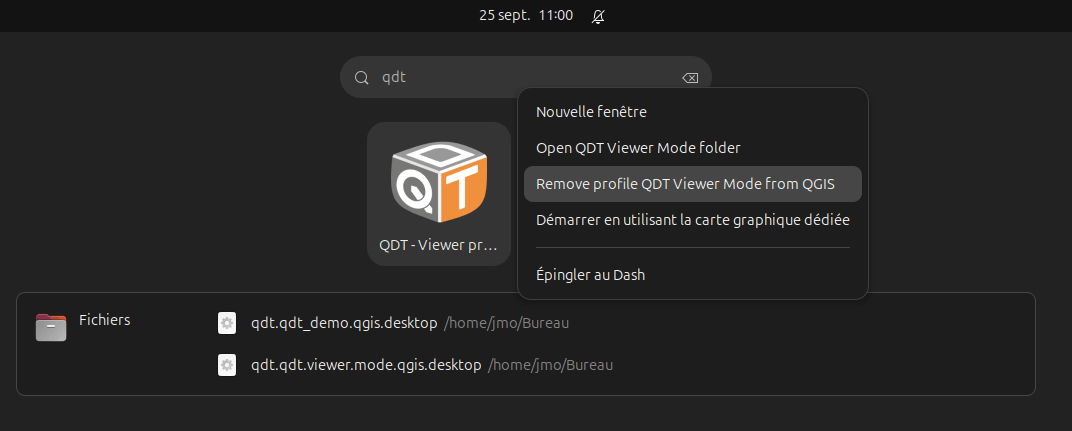
On Linux (freedesktop), this also integrates a context menu with specific actions:
—> 📖 Shortcuts Manager
Define a splash screen
🎯 Customize the QGIS splash screen for each profile.

Set the default profile
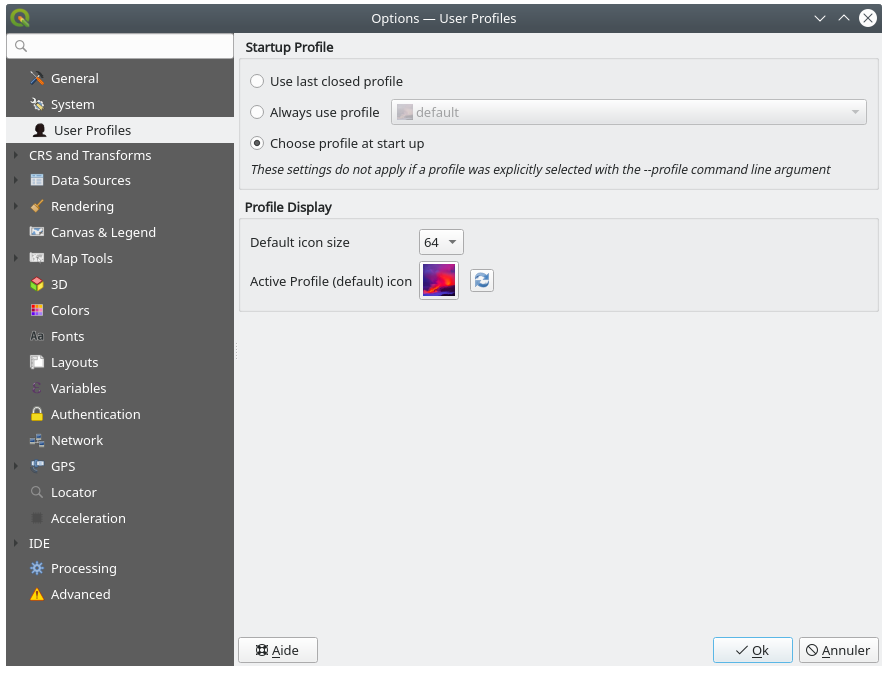
🎯 Define the default profile to use when launching QGIS to prevent the end user from having to select it each time or encourage them to use a specific profile.
Concretly, it allows the QGIS admin to specify the profile policy when launching QGIS (profiles.ini file):
[core]
defaultProfile=Oslandia
lastProfile=default
selectionPolicy=1
Variabilize QGIS INI files
🎯 Allow the use of environment variables in QGIS INI files to avoid hardcoded values and facilitate profile portability.
Example of usage in a QGIS3.ini file, you can write:
[svg]
searchPathsForSVG=/usr/share/qgis/svg/,$ORG_QGIS_COMMONS/svg/
If the ORG_QGIS_COMMONS environment variable is defined in QDT’s runtime environment, its value will be used to complete the SVG file search path for QGIS.
Deployment rules
🎯 Deploy a profile based on certain conditions related to the user’s context:
environment variable
domain (AD) or local groups of the current user
date and time
technical environment (operating system, etc.)
{
    "rules": [
        {
            "name": "QDT_IS_GIS_ADMIN exists",
            "description": "Deploy only if $env:QDT_IS_GIS_ADMIN exists",
            "conditions": {
                "all": [
                    {
                        "path": "$.env.QDT_IS_GIS_ADMIN",
                        "operator": "not_equal",
                        "value": ""
                    },
                    {
                        "path": "$.environment.operating_system_code",
                        "value": "windows",
                        "operator": "equal"
                    },
                    {
                        "path": "$.date.current_year",
                        "value": 2023,
                        "operator": "greater_than_inclusive"
                    }
                ]
            }
        }
    ]
}
—> 📖 QDT Rules
Graphical editor
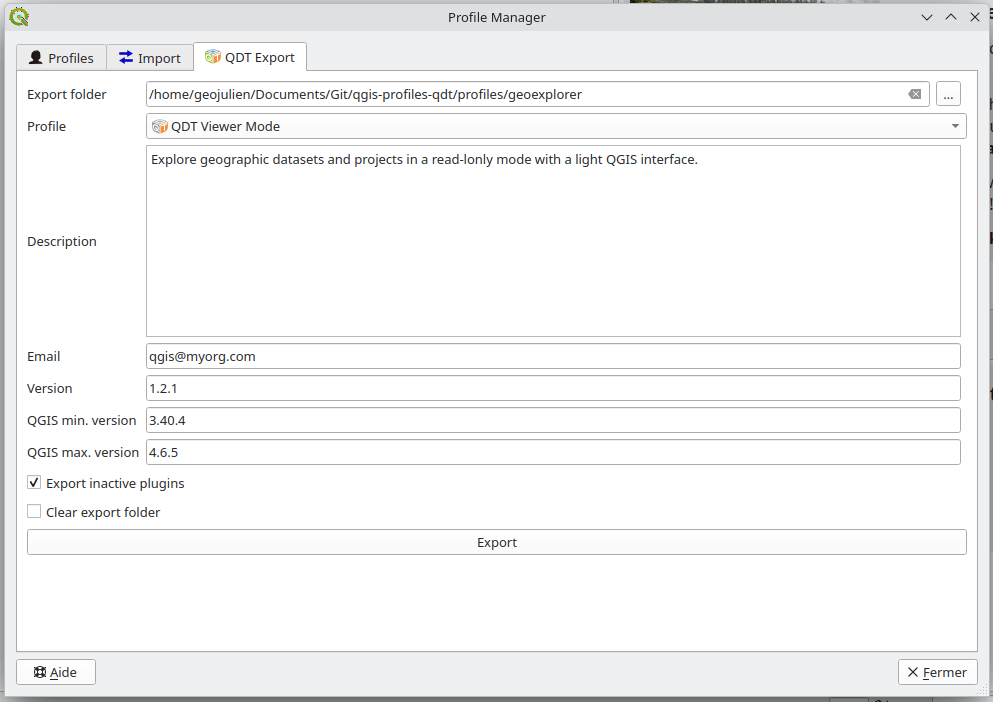
🎯 Facilitate the editing of QGIS profiles for QDT with a graphical interface.
Since 2024, the Profile Manager plugin for QGIS, initially created by WhereGroup, includes a QDT tab allowing the user to export a profile from QGIS in the QDT formalism:
Technical tooling
a clearly stated software security policy equipped with control mechanisms: Security Policy
JSON Schemas to validate
scenario.qdt.ymlandprofile.jsoncommand autocompletion for commands, options, and command-line arguments (CLI) to facilitate usage
verbose logging that automatically rotates
modern, advanced, and tested Python code
a software forge supporting development based on DevOps principles